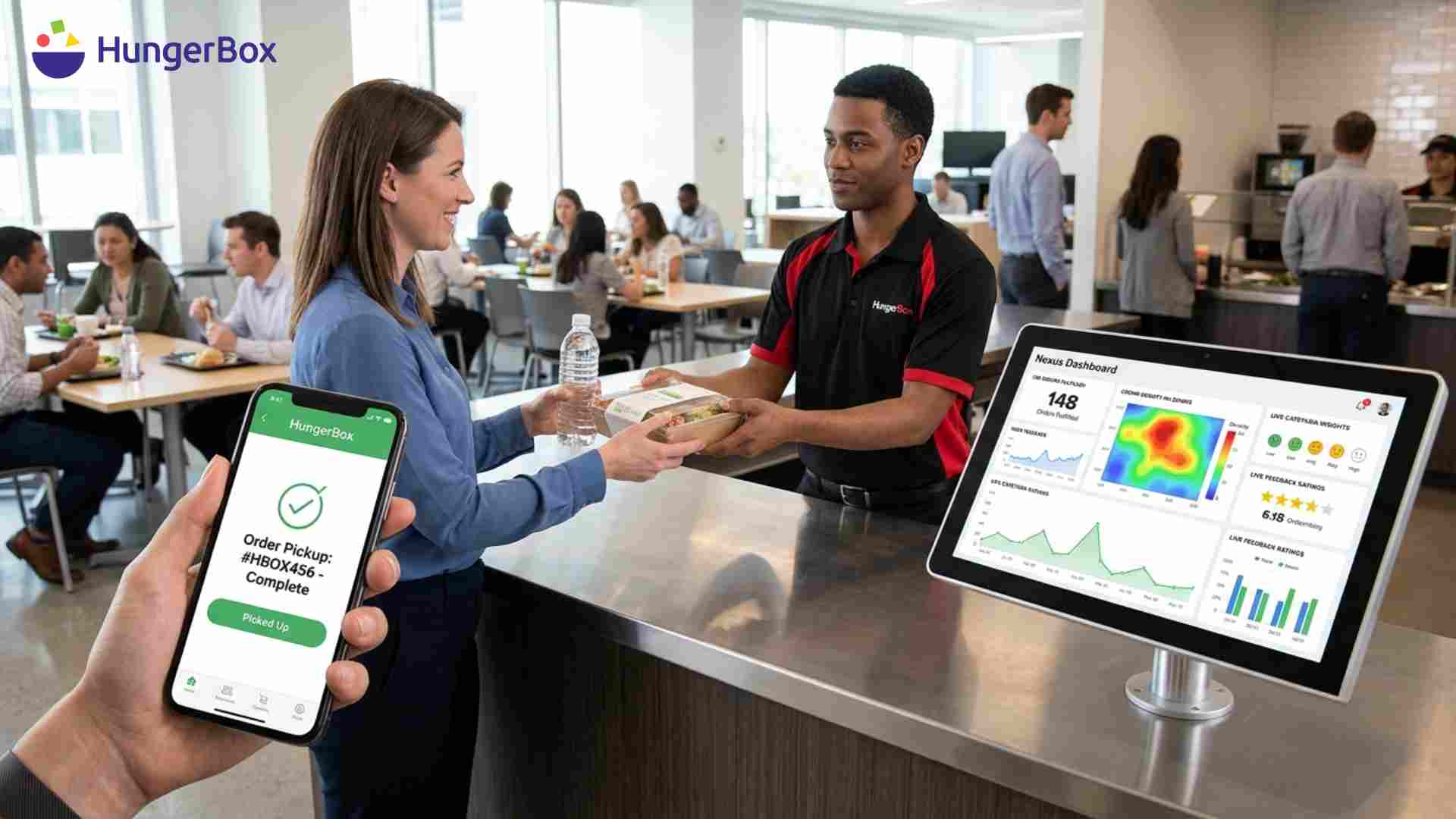
What Is the Nexus Dashboard? Real-Time Cafeteria Analytics Explained
Facility managers often run cafeterias without knowing what is really happening inside them. How many meals were served today? Which vendor is getting the best feedback? Are meal subsidies being used the right way? Without clear numbers, these questions are hard to answer, and decisions end up based on guesswork instead of facts.
This is exactly why real-time data matters, and why Cafeteria Analytics Explained in simple terms comes down to one thing: giving facility managers a clear, live view of everything happening in their cafeteria. HungerBox built the Nexus dashboard to do just that. It acts as a control room where managers can watch sales, track vendor performance, manage meal benefits, and read employee feedback, all from one screen.
In this guide, we will break down what the Nexus dashboard is, how it works, and why it matters for anyone managing a workplace cafeteria. You will also see its key features and the real benefits it brings to daily operations.
By the end, you will understand why more facility managers are moving away from guesswork and turning to live dashboards to run their cafeterias better.
Let's dive in.
H2: What Is the Nexus Dashboard?
The Nexus dashboard is HungerBox's tool built specifically for facility managers. Think of it as the control room for your cafeteria. Instead of checking with vendors over calls or waiting for weekly reports, you get live updates on sales, vendor performance, and employee engagement, all in one place.
It connects directly to the ordering system and kitchen operations, so the data you see is not old or delayed. This is the core idea behind Cafeteria Analytics Explained simply: real numbers, shown in real time, so you can act on them right away instead of waiting for the end of the month.
You can explore the full product suite, including Nexus, on the HungerBox product page.
H2: How Does the Nexus Dashboard Work?
The dashboard pulls data from every part of the cafeteria system and displays it clearly for facility managers. Here is how it comes together:
- Orders and sales are tracked live as employees place orders through the app, kiosk, or counter.
- Vendor performance is measured based on order volume, speed, and ratings.
- Employee feedback is collected after meals and shown directly on the dashboard.
- Meal benefits and subsidies are tracked, so managers know exactly who used what.
- Access controls are managed, letting managers decide who can use the app, based on office domain or manual approval.
All of this happens without manual reports or spreadsheets, which saves time and avoids mistakes.
H2: Key Features of the Nexus Dashboard
H3: 1. Real-Time Monitoring
Facility managers can see daily sales, order volumes, and vendor activity as it happens. There is no need to wait for a weekly summary to know how the cafeteria is doing.
H3: 2. Vendor Ratings and Feedback
Every vendor's performance is tracked using employee feedback and ratings. This makes it easy to spot which vendors are doing well and which ones need a conversation.
H3: 3. Meal Benefit Configuration
Many companies offer free or subsidised meals to certain employees. The dashboard lets managers set these rules by role, so the right people get the right benefits without manual tracking.
H3: 4. Access Management
Managers can control who is allowed to use the cafeteria app. This can be limited to verified company email domains or opened up for self-signup, depending on what the office needs.
H3: 5. On-Demand Food Options
Beyond regular meals, the dashboard supports packed meals, vending machines, and fine-dining options, giving facility managers flexibility to offer more than just a standard cafeteria menu.
H3: 6. Promotions and Announcements
Facility managers can run food festivals or special offers directly through in-app banners and push alerts, all managed from the same dashboard.
H2: Why Real-Time Analytics Matter for Facility Managers
Here is a simple look at how things change once a facility manager has access to real-time cafeteria data.
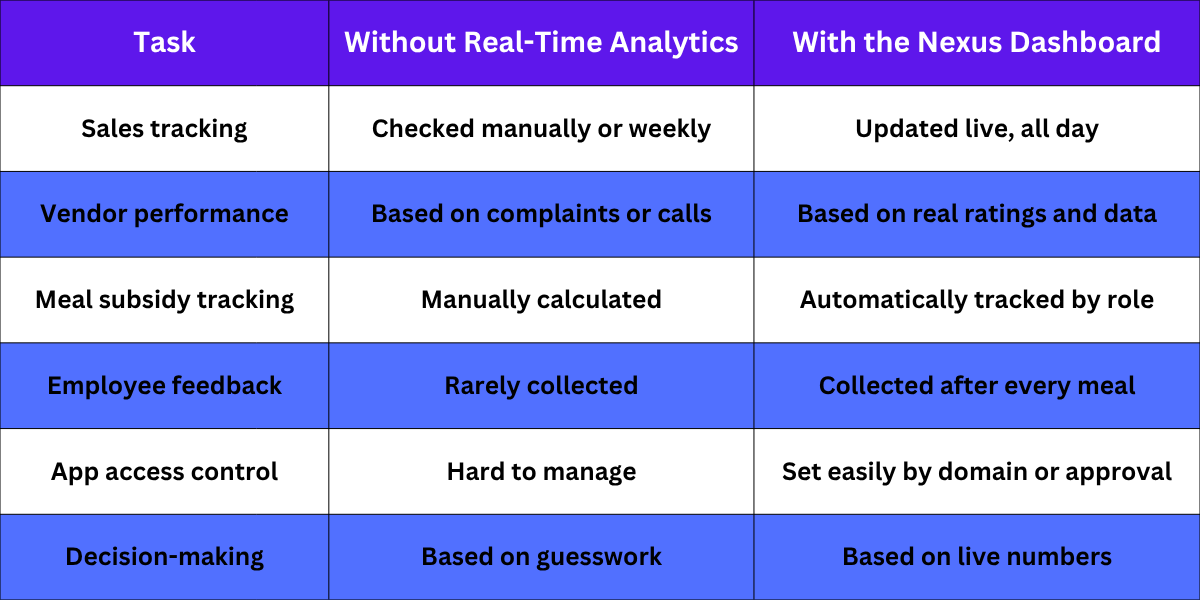
As shown above, the shift from manual tracking to real-time analytics changes how confidently a facility manager can run daily operations.
H2: Benefits of Using the Nexus Dashboard
Faster Decision-Making
When you can see sales and vendor data live, you do not have to wait for a report to fix a problem. You can act the same day.
Better Vendor Accountability
Clear ratings and performance data make it easy to have fact-based conversations with vendors, instead of relying on one-off complaints.
Accurate Meal Benefit Tracking
Subsidy rules are applied automatically, so there is no confusion over who gets what, and no manual calculation needed at the end of the month.
Improved Employee Experience
With feedback collected regularly, facility managers can catch small issues before they turn into bigger complaints.
More Control Over Cafeteria Access
Deciding who can use the app, and how, becomes simple with built-in access management, which is especially useful for offices with strict entry rules.
H3: Where the Nexus Dashboard Fits Best
The Nexus dashboard is useful across different kinds of workplaces, not just standard offices. It works especially well in:
- Corporate offices, where facility managers need clear data on daily meal usage and vendor performance. Learn more about HungerBox's corporate cafeteria management solutions.
- IT parks and malls, where high footfall and multiple vendors make real-time tracking essential. See how HungerBox supports IT park and mall cafeteria management.
- Colleges, where subsidy tracking and access control matter for large student populations. Check out HungerBox's college cafeteria management solutions.
If your facility falls into any of these categories, the Nexus dashboard can give you the visibility you need to run things smoothly.
H2: Final Thoughts
Cafeteria Analytics Explained simply means having the right numbers at the right time, so you can make better decisions without guessing. The Nexus dashboard brings this to facility managers by combining sales tracking, vendor ratings, subsidy management, and access control into one live view.
If you are still relying on manual reports or weekly updates from vendors, it may be time to switch to a system that shows you everything as it happens. Explore the full HungerBox product suite to see how Nexus fits into a complete cafeteria management setup.
Ready to see the Nexus dashboard in action? Schedule a call with our team, or contact us to learn how HungerBox can bring real-time analytics to your cafeteria.
H2: Key Takeaways
- The Nexus dashboard is HungerBox's real-time control panel built for facility managers.
- It tracks sales, vendor performance, employee feedback, and meal subsidies live, without manual reports.
- Key features include real-time monitoring, vendor ratings, meal benefit configuration, and access management.
- Facility managers get faster decision-making, better vendor accountability, and improved control over cafeteria access.
- It works well across corporate offices, IT parks, malls, and colleges that need clear, live cafeteria data.
Frequestly Asked Questions

It is used by facility managers to track cafeteria sales, vendor performance, and employee feedback in real time. It replaces manual reports and weekly updates from vendors. This gives managers a clear, live view of daily cafeteria operations.
It lets managers set subsidy or free meal rules based on employee roles. The system then tracks usage automatically without manual calculations. This removes confusion over who qualifies for what benefit.
Yes, it tracks performance and ratings for each vendor separately on one screen. Managers can see which vendors are doing well based on real data. This makes vendor conversations easier and more fact-based.
Yes, it includes access management features for this exact purpose. Managers can restrict app use to verified company email domains or allow self-signup. This gives better control over who orders through the system.
No, it works well for offices, tech parks, malls, and colleges of different sizes. The core benefit, real-time data, is useful no matter how big the facility is. The setup simply adjusts based on your specific needs.