What Is a Cafeteria Management System? A Complete Guide for Facility Managers
Running a cafeteria is not easy. There are meal bookings to track, staff to manage, food quality to check, and bills to settle. If you are doing all this by hand, it takes up a lot of your day and still leaves room for mistakes.
This is where a cafeteria management system comes in. It is software built to handle the daily work of running a workplace cafeteria. From menu planning to payments, it brings everything to one place so facility managers can spend less time on paperwork and more time on things that matter, like food quality and employee happiness.
In this guide, we will explain what a cafeteria management system is, how it works, and why more companies are using one. You will also learn about its main features, the benefits it brings to your workplace, and how to pick the right system for your office.
If you manage a cafeteria for a large office or a company with many locations, this guide will help you understand what to look for. By the end, you will know exactly why a good cafeteria management system can make daily operations smoother and save your team real time and money.
Let's get started.
H2: What Is a Cafeteria Management System?
A cafeteria management system is a software tool that helps businesses manage their workplace food services. It handles jobs like meal ordering, payments, vendor management, and feedback collection, all through one app or dashboard.
Instead of using paper registers, cash counters, and manual attendance sheets, everything moves online. Employees can check the menu, book their meals, and pay through the app. Facility managers get real-time data on orders, spending, and food waste.
In short, a cafeteria management system removes the guesswork from running a canteen. It gives you clear numbers and control over how your cafeteria runs every single day.
H2: How Does a Cafeteria Management System Work?
Most systems work in a simple, step-by-step way:
- Menu setup – The cafeteria team or vendor uploads the daily or weekly menu.
- Meal booking – Employees view the menu on an app and place their orders in advance.
- Payment – Payment happens through the app using wallets, cards, or salary deductions.
- Order tracking – The kitchen team gets a live count of meals needed, which cuts down food waste.
- Reporting – Facility managers get reports on usage, spending, and feedback.
This flow keeps things simple for everyone, employees, kitchen staff, and managers.
H2: Key Features of a Good Cafeteria Management System
Not all systems offer the same features. Here are the ones that matter most for facility managers.
1. Online Meal Ordering
Employees should be able to see the menu and place orders from their phone or laptop. This cuts down long queues and confusion during meal hours.
2. Cashless Payments
A good system supports digital payments through wallets, cards, or UPI. This removes the need for cash handling and makes billing accurate.
3. Multi-Vendor Management
If your office works with more than one food vendor, the system should let you manage all of them from one dashboard, including menus, pricing, and payments.
4. Real-Time Reporting
Facility managers need data on daily orders, peak hours, spending patterns, and food waste. Good reporting helps you plan better and cut costs.
5. Feedback and Ratings
Employees should be able to rate meals and share feedback. This helps you catch quality issues early and keep food standards high.
6. Attendance and Subsidy Tracking
Many companies offer meal subsidies to staff. The system should track who used their subsidy and how much the company needs to pay vendors.
H2: Why Facility Managers Need a Cafeteria Management System
Here is a quick look at what changes when you move from manual cafeteria management to a digital system.
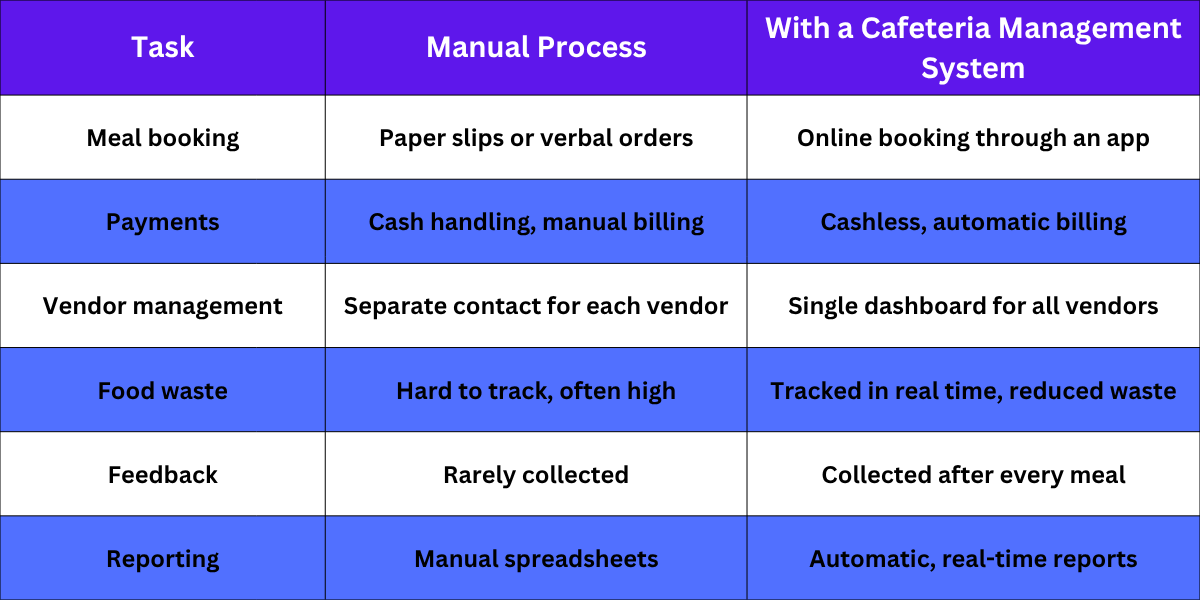
As you can see, the difference is clear. A cafeteria management system saves time, cuts errors, and gives facility managers better control over daily operations.
H2: Benefits of Using a Cafeteria Management System
Saves Time for Facility Managers
You no longer need to manually track orders, payments, or vendor bills. The system does this for you, freeing up hours every week.
Reduces Food Waste
When kitchens know exactly how many meals to prepare, they cook less extra food. This saves money and cuts down waste.
Improves Employee Experience
Employees get a smooth way to check menus, order food, and pay without waiting in long lines. Happy employees also tend to give better feedback about their workplace.
Better Cost Control
With clear reports on spending and subsidies, companies can plan budgets better and avoid overspending on food services.
Easy Vendor Coordination
Managing multiple vendors becomes simple when everything is tracked on one dashboard instead of juggling calls and emails.
H2: How to Choose the Right Cafeteria Management System
When picking a system for your office, keep these points in mind:
- Check if it supports cashless payments and subsidy tracking.
- Make sure it can handle multiple vendors if you work with more than one.
- Look for real-time reporting and analytics.
- Check if the app is easy for employees to use.
- Ask about support and setup time before signing up.
A good vendor will walk you through all of this before you commit. If you want to see how this works for your office, you can check HungerBox's corporate cafeteria management services to understand how a full-scale system is set up and run.
H2: Final Thoughts
A cafeteria management system is no longer just a nice-to-have. For facility managers handling large offices or multiple locations, it is a practical way to save time, cut costs, and keep employees happy with better food service.
If you are still managing your cafeteria with spreadsheets and cash counters, it may be time for a change. A good system pays for itself through saved time, lower food waste, and smoother daily operations.
Want to see how it works for your office? Schedule a call with our team, or simply contact us to learn more about setting up a cafeteria management system for your workplace.
H2: Key Takeaways
- A cafeteria management system automates meal booking, payments, and vendor management for workplace cafeterias.
- Key features include online ordering, cashless payments, multi-vendor management, and real-time reporting.
- It saves time for facility managers, reduces food waste, and improves the employee dining experience.
- Choosing the right system depends on your vendor count, budget tracking needs, and how easy the app is for employees.
- HungerBox offers a complete cafeteria management solution built for facility managers handling large or multi-location offices.
Frequestly Asked Questions

It is used to manage meal bookings, payments, and vendor coordination in workplace cafeterias. It replaces manual processes like paper registers and cash handling. This makes daily cafeteria operations faster and more accurate.
It gives kitchens a live count of meals ordered in advance. This helps them cook only what is needed instead of guessing quantities. Less guesswork means less food is thrown away.
Yes, most good systems let you manage several vendors from one dashboard. You can track menus, pricing, and payments for each vendor separately. This makes coordination much simpler for facility managers.
No, it works well for offices of any size that want to simplify their food services. Smaller offices also benefit from cashless payments and better reporting. The size of your team decides how you configure the system, not whether you can use it.
You can reach out to a provider like HungerBox to understand your options. They will walk you through setup, features, and pricing based on your needs. It is best to schedule a call or contact their team directly to begin.